

- よく見られているキーワード
-
- 関連するキーワードで絞り込む
-
What is Manual Complete?
The Manual Complete feature allows you to mark orders that have already been processed outside of WisE but remain incomplete on WisE as completed.
Please refer to the release note below for more details:
<CR136 Detailed Explanation>
This feature can be requested only if all three of the following conditions are met:
1. The process has been completed outside of WisE.
2. There are no plans to update the relevant information in WisE in the future.
3. All receiving and shipping activities for the remaining items in the target order have been completed.
In principle, it is not possible to manually complete only a portion of the remaining items.
Items for which Exp Inbound has not been completed are excluded. Please handle them as usual using Order Cancellation.
For the time being, this applies to orders issued by the end of December 2024 and for which the CPO (Contract Prescription) has not yet been completed.
Who Should Submit the Request and Which Form Should Be Used?
1. Check the order status in Data Search > Reports > SCM Report.
2. Then, use the table below to select the appropriate form.
| Current Process Status | SCM Report Status | Requester | Form to Use | Request Unit |
|---|---|---|---|---|
| Exp Inbound completed, Vanning not completed | After Exp Inbound / Before Vanning | Exp TTC | After Exp Inbound | Quantity (all remaining quantity) ^1 |
| Exp Vanning completed, Shipping Doc not created | Before Shipping | Exp TTC | After Exp Vanning | By Case No. |
| Imp Vanning completed, Imp Inbound not completed (Imp Vanning only) | On Shipping | Imp TTC | After Imp Vanning | Invoice × Case ^2 |
| Shipping Doc completed, Imp Inbound not completed | On Shipping | Imp TTC | After Shipping | By Case No. |
| Imp Inbound completed, Imp Outbound not completed | In Imp Warehouse | Imp TTC | After Imp Inbound | Quantity (all remaining quantity) ^1 |
^1 Manual Complete Qty. This can only be processed in the following cases.
After Exp Inbound: Remaining number of CPO × EPO × WisE P/N = Manual Complete Qty
After Imp Inbound: Remaining quantity = Manual Complete Qty
^2 If you do not enter a Case No., all cases included in the invoice will be manually completed.
How to submit a Manual Process Complete Request?
1) Please obtain and fill out the request form from the link below or from Vivi under the “Request Manual Process Completion” option.
<Manual Process Completion Forms>
What are the information to input into the form?
Please enter the necessary information, such as order details, product code, reference, and requested by.
The fields you need to fill in will vary depending on the form.
ETD, ETA, Invoice No., Reference, Requested by, etc., are reflected in WisE data such as Shipping Status, SCM Report, and Manual Complete History, and are used for checking and searching history. Please enter as much detail as possible in the second tab of the form.
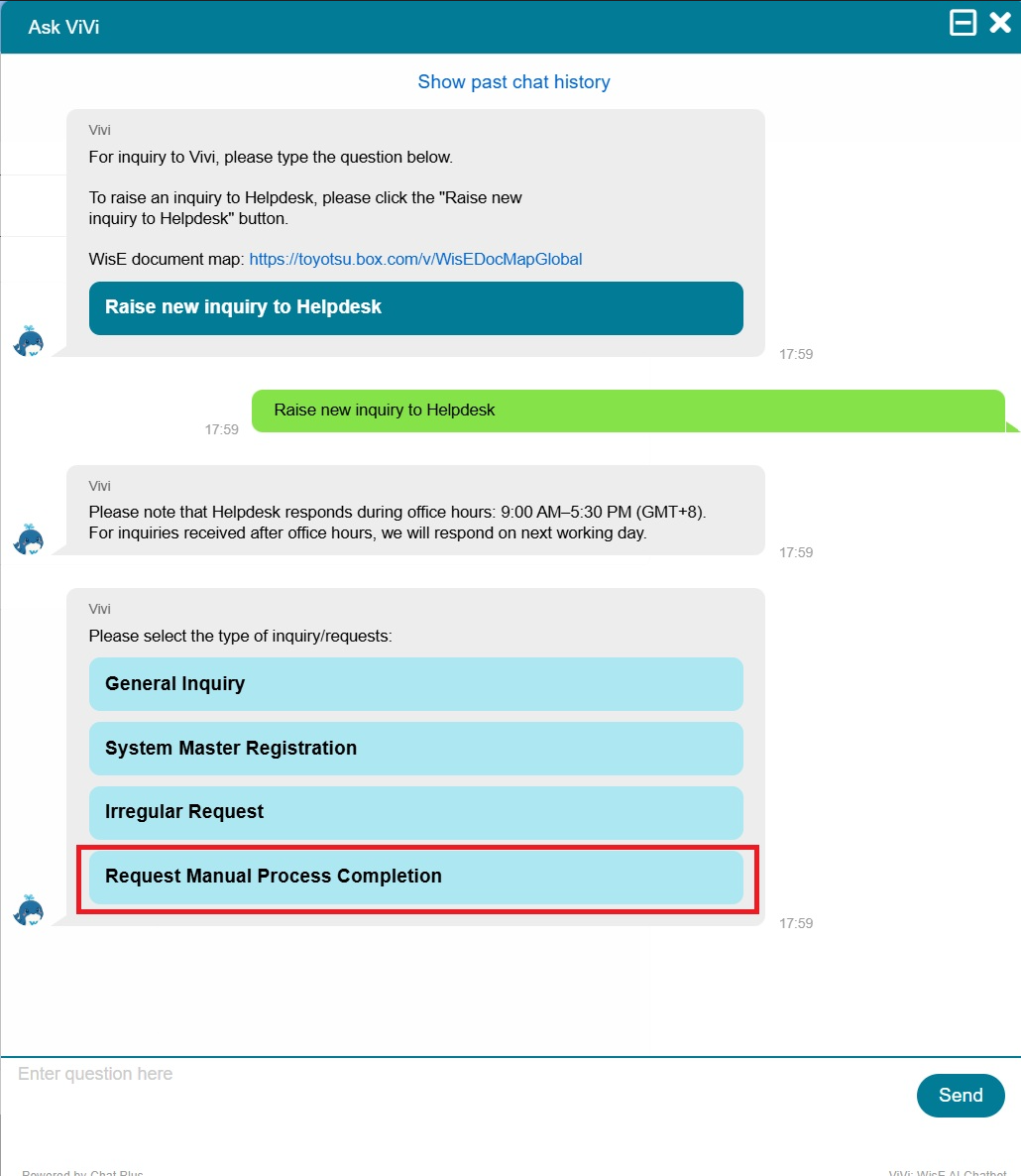
2) Open Need Help > Vivi and submit the form using the Request Manual Process Completion button.
3) Please be sure to check before submitting.
- Please submit the documents only after confirming them with both the exporting and importing countries.
- The information you enter, such as ETD, ETA, Invoice No., Reference, and Requested by, will be reflected in WisE's data and used for reviewing and searching your history. Please enter as much detail as possible.
- The form also contains other important notes. Please read them carefully before submitting.
Related FAQ
How will the data and reports change after Manual Process Completion?